
Select an operational scope, define the reference date and prepare catalogue and stock balances. The templates below help your team organize files for pre-validation in the application before confirming any processing.
Define the scope before preparing spreadsheets
Agree on the products, locations and snapshot date. A consistent scope makes it easier to connect results to a concrete business question. Consider both what the sample represents and what falls outside it.
Inventory age depends on receipt information, while financial analysis depends on supplied costs. Missing or inconsistent data limits analysis and should not be filled with estimates presented as facts.
Blank templates and examples serve different purposes
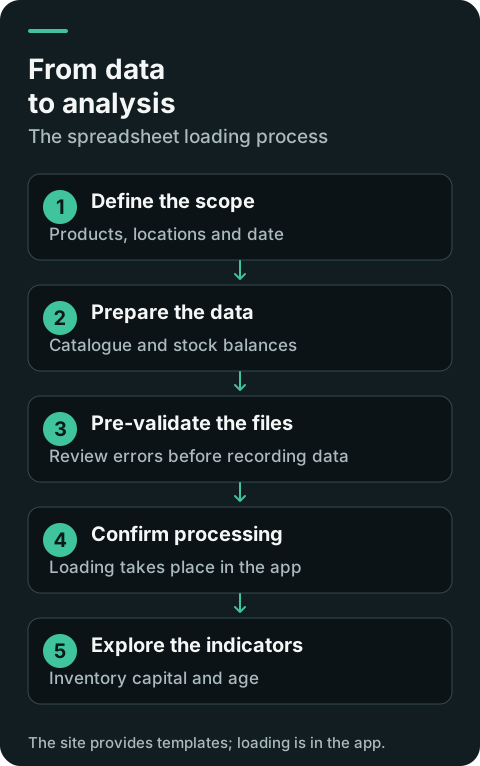
Use blank templates to prepare the load. Fictitious examples explain the format and contain no customer data. Preserve codes as text, particularly where leading zeros are present.
Import and pre-validation take place in the application. This website provides downloads and instructions; it does not receive catalogue or stock files.
1. SKU catalog
CODIGO_SKU, DESCRICAO_SKU, DEPARTAMENTO_SKU, CATEGORIA_SKU, SUBCATEGORIA_SKU, FAMILIA_SKU
CODIGO_SKU must be unique within the tenant and entered as text to preserve leading zeros. Description is required. The hierarchy follows Department → Category → Subcategory → Family → SKU. Do not add columns, surrounding spaces, formulas, macros or hyperlinks.
2. Inventory balances
CODIGO_LOCALIDADE, CODIGO_SKU, DATA_ENTRADA, CUSTO_UNITARIO, SALDO_ATUAL, DATA_SNAPSHOT
The location must already exist and the SKU must belong to the tenant. Balance may be zero, never negative. Use YYYY-MM-DD dates. Numbers allow up to four decimal places, comma or point, without thousands separators. Rows for the same location and snapshot date are grouped.
3. Pre-validation and processing
Pre-validation does not write data. The report identifies file, row, column, error code and description. Confirmation/processing happens afterwards in the app. The institutional site does not accept uploads; there is no silent correction or truncation.